
Playable Demo Funnel That Converts: Next Fest Instrumentation, Steam Store Optimization, and Post-Demo Follow‑Up
Why a “demo funnel” matters (and what “conversion” really means)
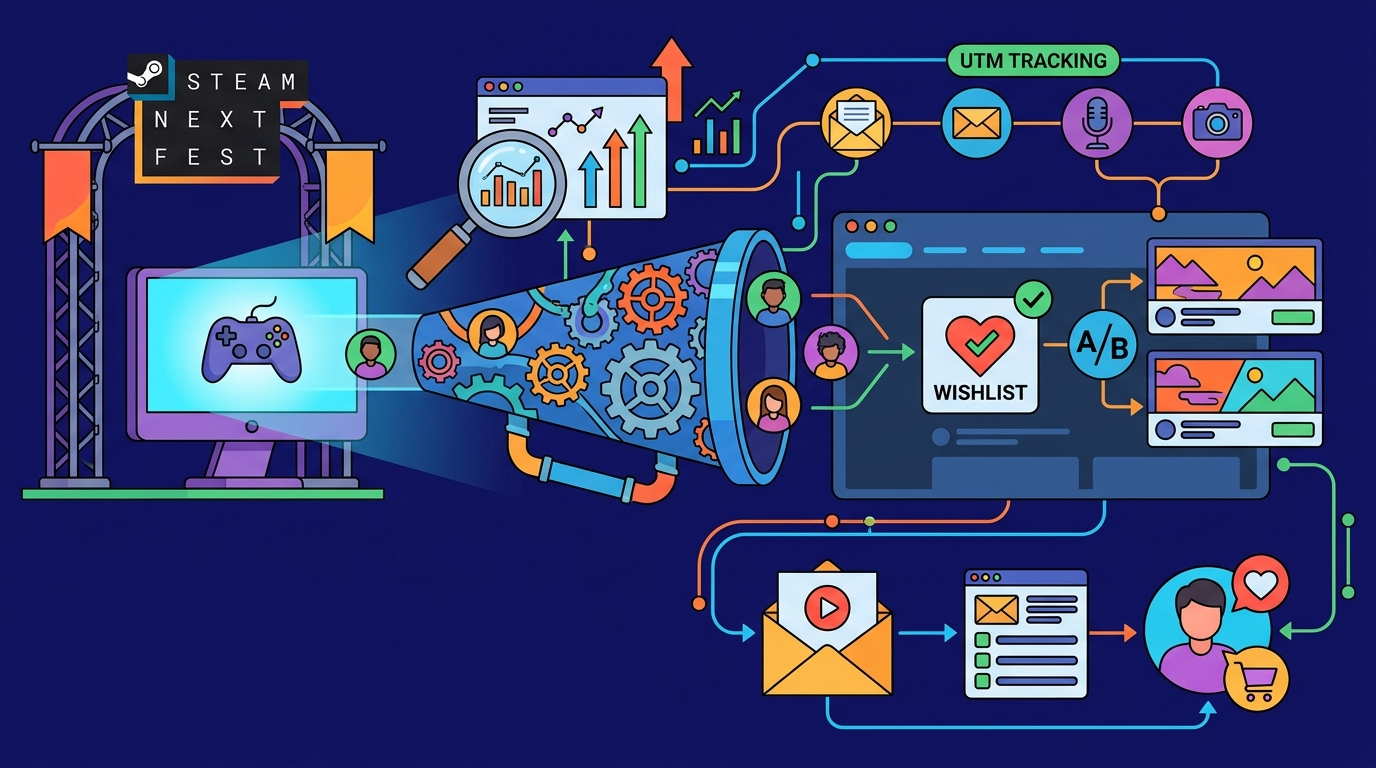
A Steam demo isn’t just a build—it’s a conversion funnel that should turn curious players into wishlists, emails, and community members you can reach again.
For Steam Next Fest, the goal is to maximize qualified traffic, reduce friction, and prove your game’s promise fast enough that players take an action before they bounce.
- Primary conversion: Wishlist (Steam-native, strongest predictor of launch performance)
- Secondary conversions: Email opt-in, Discord join, follow on Steam, social follows
- Product signal: Median session length, completion rate of the demo “hook,” crash rate, negative review drivers
Ship a demo vs run a playtest: choosing the right vehicle
When a Steam Playtest is the better choice
Use Steam Playtest when you need feedback, balance data, onboarding validation, or performance testing without permanently exposing a public demo.
- You want to gate access (waves, limited periods, region/device targeting via keys or invites).
- Your opening hour is still changing and you don’t want old impressions to stick.
- You need to test servers/multiplayer and want controlled concurrency.
When a public demo is the right move
Ship a public demo when your core loop is stable and you’re ready to convert broad traffic into wishlists—especially during Next Fest, seasonal events, or creator pushes.
- You have a strong first 10–20 minutes with clear “aha” value.
- Your store page is already solid and you can support a spike in players.
- You’re prepared to patch quickly and communicate updates.
Rule of thumb: If you’re still asking “what is the game, exactly?” run a playtest. If you’re asking “how do we get more wishlists from traffic?” ship a demo.
Demo scope decisions that protect the full game (and still sell it)
Design the demo around a single promise
Pick one promise your game makes and structure the demo to deliver it quickly. That promise might be “tense stealth escapes,” “cozy crafting satisfaction,” or “tight roguelite combat with build variety.”
If your demo tries to represent the entire game, it often becomes a slow tutorial that converts poorly.
Use a “vertical slice + cliffhanger” structure
- Hook (0–3 min): Immediate fantasy + a small win
- Teach (3–10 min): Onboarding that unlocks the core loop
- Prove (10–25 min): One full loop with meaningful choice
- Cliffhanger (end): Tease next system/biome/boss/story beat
Protect content without feeling stingy
- Limit breadth, not quality: One biome, fewer weapons, one character—polished.
- Gate spoilers: Avoid late-game twists; tease them via art, codex entries, or a short trailer at the end.
- Avoid save carryover promises too early: If you can’t guarantee it, don’t market it.
- Prevent “demo completion = done”: End right after a peak moment, not after a cooldown.
Instrumentation: what to track before you drive traffic
Define your funnel events
You can’t improve what you don’t measure. Before Next Fest traffic hits, decide what “success” looks like and instrument the steps that lead there.
- Demo acquisition: Store page visits → demo downloads
- Activation: Demo downloads → first launch
- Engagement: First launch → median session length, key milestones reached
- Conversion: Wishlist click, email opt-in, Discord join, Steam follow
Practical instrumentation options (lightweight to advanced)
At minimum, use Steam’s built-in reporting plus a simple landing page for email capture. For deeper insight, add in-demo event logging (even if it’s just milestones and session length).
- Steamworks: Wishlist additions, demo downloads, traffic sources, event performance
- In-demo analytics: Milestones, deaths, quit points, time-to-fun, hardware/perf
- Landing page analytics: Email form conversion rate, referral UTMs
GameTrowel helps by tying UTM-tagged links, mailing list signups, and campaign analytics together so you can see which creators and posts actually moved wishlists and emails.
Steam store-page optimization for demo traffic (what to fix first)
Optimize your first 5 seconds: capsule, tagline, trailer start
Next Fest traffic is skimmable. Your capsule and first line should communicate genre + fantasy + twist instantly.
- Capsule art: High contrast, readable at small sizes, one focal subject
- Tagline: “Action roguelite” is not a hook; “Build broken spells from stolen memories” is
- Trailer start: Show gameplay in the first 2–3 seconds, not logos
A/B test what you can (and what actually moves outcomes)
Steam doesn’t provide native A/B testing for capsules on demand, but you can still run controlled tests by changing one element at a time and measuring the downstream effects during comparable traffic windows.
- Test 1: Capsule variant A vs B (48–72 hours each)
- Test 2: Short description headline and first sentence
- Test 3: Tagline on your external landing page for creator traffic
- Test 4: Top 5 tags (genre alignment impacts recommendation quality)
In GameTrowel, you can track these changes alongside Steam tag analysis and wishlist tracking so you’re not guessing which iteration improved conversion.
Fix mismatched genre tags before you buy attention
Mismatched tags are a silent killer: they bring the wrong players, reduce session length, and generate negative sentiment that suppresses algorithmic lift.
- Use accurate primary genre tags first, then flavor tags.
- Compare your tag set to close competitors (not aspirational AAA outliers).
- Ensure your trailer and screenshots match the tags you’re claiming.
In-demo CTA placement that converts without annoying players
Principles: ask at moments of earned excitement
CTAs work best right after a win: finishing a run, beating a boss, unlocking a new system, or reaching the cliffhanger. Asking on boot is high-friction and feels like an ad.
- One primary CTA per moment: Don’t stack wishlist + email + Discord in a single modal.
- Make it skippable: Always provide “Not now” and remember the choice.
- Use soft prompts first: UI button in the pause menu before a pop-up.
Recommended CTA map (low annoyance, high intent)
- Pause menu: “Wishlist on Steam” (always available)
- After the first satisfying loop: Small toast or end-of-run screen with wishlist button
- At demo end cliffhanger: Larger screen: wishlist + optional email signup
- On crash/bug report screen: Link to Discord or support form (contextual)
Email, Discord, and wishlist: how to prioritize
For most indie launches, prioritize in this order: wishlist first, email second, Discord third. Discord is powerful, but it’s a higher-commitment step and can distract from the wishlist action.
Use GameTrowel’s embeddable signup forms on a demo landing page and keep the in-demo email CTA as a link or QR code to avoid complex UI work.
UTM tracking for creator links (and how to keep it clean)
Use a consistent naming convention
UTMs let you attribute wishlists/emails to specific creators, posts, and platforms. The key is consistency so you can aggregate results.
- utm_source: creator name (e.g., splattercat)
- utm_medium: platform (e.g., youtube, tiktok, twitch)
- utm_campaign: event (e.g., nextfest_june2026)
- utm_content: video title or post ID (optional)
Where to send UTM traffic
Send creators to either your Steam page directly (simplest) or to a fast landing page that mirrors your Steam pitch and includes email signup.
- Steam direct: Best for maximizing wishlists with minimal friction
- Landing page first: Best when you want emails, press kit access, and multiple CTAs
GameTrowel’s landing pages and analytics dashboard are designed for this: you can generate UTM links, embed signup forms, and see conversion by creator without duct-taping multiple tools.
Steam event setup for Next Fest (and beyond)
Create events that give players a reason to return
Steam Events can drive visibility and re-engagement during the fest and afterward. Treat them like “content drops,” not announcements into a void.
- Demo launch event: What’s in the demo, what’s new, what feedback you want
- Patch notes events: Frequent, short, with player-facing fixes first
- Roadmap / what’s next: Clear next milestone and expected timing
- Livestream event: Dev playthrough + Q&A + wishlist reminder
Link your event strategy to your follow-up sequence
Every event should point to one next step: wishlist, follow, join mailing list, or play the updated demo. Avoid asking for everything at once.
Analytics to watch (and what “good” looks like)
Core demo funnel metrics
- Demo downloads: Measures top-of-funnel pull and store page clarity
- Median session length: Measures whether the demo delivers on the promise
- Wishlist rate: Wishlists / unique demo players (or / store page visits)
- Email opt-in rate: Emails / unique demo players (or / landing page visits)
Interpretation: diagnose the bottleneck
- High visits, low downloads: Capsule/trailer mismatch, weak hook, confusing description
- High downloads, low session length: onboarding friction, performance issues, wrong audience (tags)
- Good session length, low wishlists: missing/poorly timed CTA, unclear future value, weak cliffhanger
- Good wishlists, low emails: email offer not compelling (no clear benefit), too much friction
Post-demo follow-up: turn one-time players into launch-day buyers
Segment your audience (even if it’s simple)
At minimum, separate: demo players, email subscribers, and Discord members. Your messaging should reflect their commitment level.
- Steam followers/wishlisters: Reach via Steam announcements and events
- Email list: Best for deeper updates, roadmap context, and launch reminders
- Discord: Best for feedback loops, community building, and rapid patch validation
Follow-up sequences that work (templates)
Email sequence for demo players (opt-in):
- Day 0: “Thanks for playing” + one question (link to survey) + wishlist reminder
- Day 3–5: “Patch notes: we fixed the top issues” + what’s improved + play again CTA
- Week 2: “Roadmap update” + next feature teaser + short clip
- Week 4: “Next milestone date” + livestream/event + wishlist reminder
Steam updates for wishlisters/followers:
- Short patch notes with a GIF and a single headline change.
- Monthly roadmap posts that highlight what’s coming next, not what you already did.
- Creator spotlight posts that compile coverage (social proof) and link the demo.
GameTrowel can generate and schedule these updates, manage your mailing list, and monitor media mentions so you can quickly amplify coverage while the algorithmic window is still open.
Common pitfalls (and how to avoid them)
Demo bugs and performance spikes
Next Fest traffic is unforgiving. A crash rate that feels “minor” in small tests becomes a reputation problem at scale.
- Do a creator build and a public build with strict versioning.
- Have a hotfix pipeline ready (and a patch notes template prepared).
- Instrument and watch quit points and time-to-first-input.
Mismatched tags and misleading store presentation
If your page sells one fantasy and the demo delivers another, your median session length drops and your negative feedback rises—even if the game is good.
- Align screenshots and trailer with the first 15 minutes of the demo.
- Use competitor research to sanity-check tags and positioning.
CTA overload
Three pop-ups in the first 10 minutes can cut conversions because players feel manipulated. Use one primary CTA and make secondary CTAs optional and contextual.
Sample 4-week timeline (Next Fest-ready)
Week 1: Scope lock + instrumentation + store page pass
- Lock demo promise, start-to-finish path, and cliffhanger endpoint.
- Add milestone tracking (session length, completion, CTA clicks).
- Update capsule, short description, trailer first 10 seconds.
- Set up UTM conventions and creator link templates.
Week 2: Private playtest + CTA tuning
- Run a small Steam Playtest or closed demo branch (100–300 players).
- Identify top 3 quit points and top 3 friction bugs.
- Implement CTA map: pause menu wishlist, end-of-demo screen, optional email.
- Create Steam events draft: demo launch, first patch, livestream.
Week 3: Creator outreach + A/B iterations
- Send preview keys/branches to creators with UTM links.
- Run capsule/tagline iterations in controlled windows.
- Finalize press kit and a landing page for email capture.
- Prepare patch notes template and support/bug report flow.
Week 4: Launch prep + monitoring plan
- Ship demo, publish Steam event, schedule livestream if applicable.
- Set daily review: downloads, session length, wishlist rate, email opt-in.
- Hotfix quickly, communicate clearly, and update your event posts.
- Queue follow-up emails and Steam announcements for week 1–2 post-fest.
Metrics dashboard template (copy/paste structure)
Use this as a simple dashboard you can maintain daily during Next Fest. The point is to spot bottlenecks early and tie fixes to outcomes.
- Date
- Steam store page visits
- Demo downloads (and download rate = downloads / visits)
- Unique demo players
- Median session length
- Demo completion rate (reached cliffhanger / players)
- Wishlists added (and wishlist rate = wishlists / players)
- Email signups (and opt-in rate = signups / players or / landing visits)
- Discord joins (optional)
- Crash rate (crashes / sessions)
- Top 3 quit points (level/scene/time)
- Top 3 feedback themes
- Traffic sources (Steam internal, creators, social, press) with UTMs
- Changes shipped today (build version + notes)
Call to action
Ready to streamline your demo funnel and Next Fest workflow? GameTrowel brings landing pages, press kits, outreach, UTMs, scheduling, Steam tools, and analytics into one platform—get started free.
Ready to launch your indie game?
GameTrowel gives you everything you need — landing pages, press kits, outreach tools, media monitoring, and more — all in one platform.