
Steam Capsule Art Tournament: A Step-by-Step A/B Testing Workflow to Pick Winning Capsules Before Next Fest
Steam capsule art is one of the few levers that can change your store-page performance without touching your build.
Before a major visibility event (Next Fest, a publisher announcement, a streamer spike), the goal is to systematically pick a capsule that maximizes click-through rate (CTR) and wishlist conversion—not just “the one the team likes.”
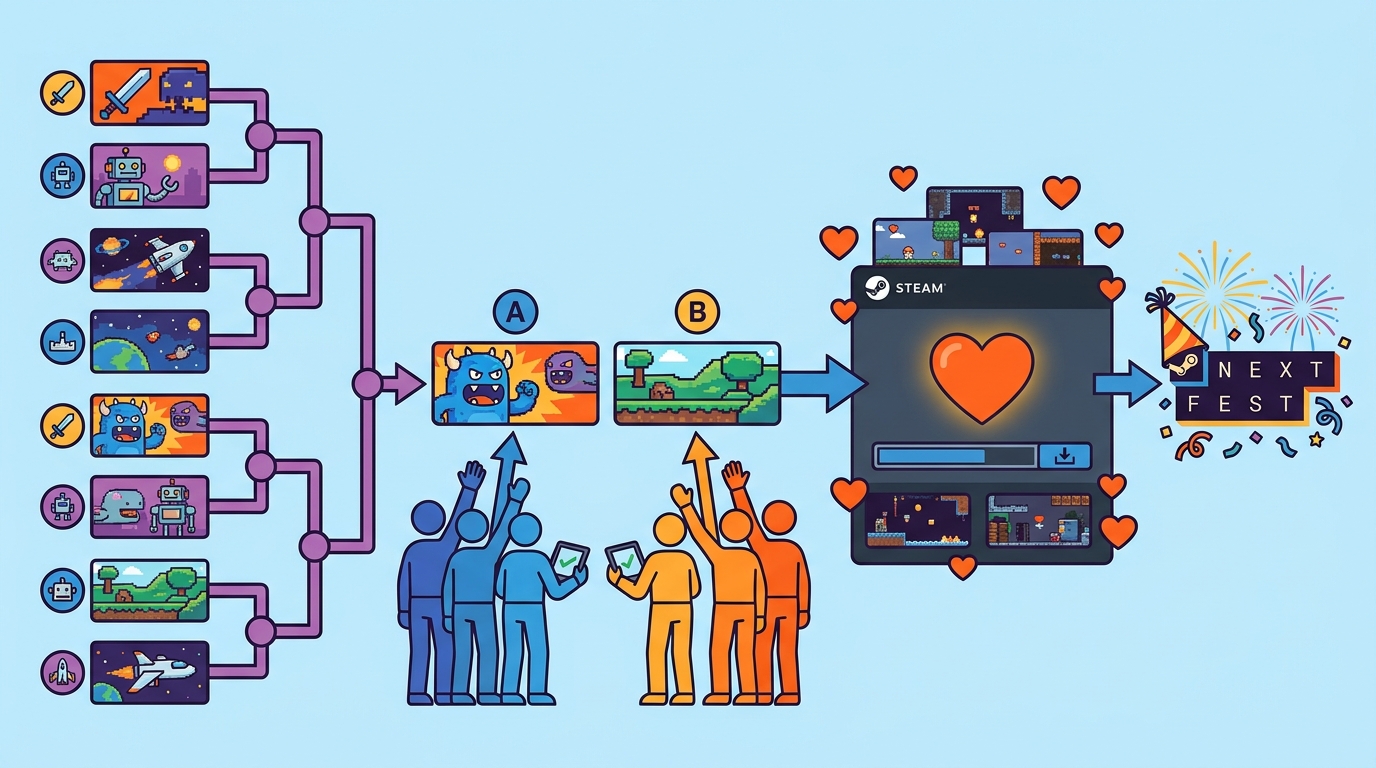
This tutorial walks you through a repeatable “capsule art tournament” workflow: generate 6–12 variants from a style grid, run sequential bracket rounds to avoid fatigue, separate appeal from clarity/genre-read, then validate finalists with micro-tests and real Steam traffic.
Why a “tournament” beats one-off polls
Most capsule polls fail because they mix too many variables at once and rely on a single vote from a biased audience.
A tournament structure reduces noise by comparing two options at a time, lets you run multiple rounds without exhausting voters, and creates a paper trail of decisions you can revisit when results change.
- Controlled comparisons: Pairwise matchups reveal preference more reliably than 12-option polls.
- Fatigue management: Short rounds keep completion rates high.
- Iterative learning: Each round teaches what signals are working (genre, contrast, character focus, logo scale).
Step 0: Define success metrics (what “winning” means)
Decide up front which metrics you’ll use to choose a winner, and which are only “diagnostic.”
- Primary: Store-page CTR from impressions (where available) and wishlist rate per visit (wishlists / visits).
- Secondary: “Appeal” vote share, “clarity/genre-read” accuracy, and qualitative comments.
- Guardrails: If clarity drops below a threshold, reject the art even if appeal is high.
In GameTrowel, you can centralize these targets in your launch timeline planner and track changes alongside Steam wishlist tracking so art iterations map to measurable outcomes.
Step 1: Build a capsule “style grid” (generate 6–12 variants intentionally)
Your goal is not “make 12 random options.” Your goal is to explore a small set of high-impact variables while keeping everything else stable.
Pick 4–5 variables that matter at tiny sizes
- Genre signal: horror (high contrast, menace), cozy (warm, soft shapes), retro (pixel/readable silhouettes), sci-fi (cool hues, tech motifs).
- Character focus: face close-up vs full body vs no character (environment iconography).
- Color temperature: warm vs cool vs split-complementary accent.
- Logo size: small (art-led) vs medium vs large (brand-led).
- Readability at tiny sizes: simplified shapes, strong silhouette, minimal text.
Create a 3x4 (or 2x6) grid that forces variety
Example 12-variant grid (each cell is one capsule):
- Rows (genre signal): “dark threat,” “mystery/curiosity,” “action intensity”
- Columns: character close-up, character mid-shot, environment icon, symbolic object
Then layer in two controlled toggles across the set: warm vs cool temperature, and small vs large logo.
GameTrowel’s AI-powered content generation can help you create a consistent prompt sheet and naming convention (e.g., G1-Close-Warm-LogoL-v03) so you don’t lose track during rounds.
Non-negotiables for fairness
- Use the same logo and same title text (if any) across all variants.
- Keep composition complexity comparable (don’t pit a polished render against a rough sketch).
- Export every variant at identical dimensions and compression settings.
Step 2: Prepare two separate tests: “Appeal” vs “Clarity/Genre-read”
These are different cognitive tasks. If you combine them, you’ll get contradictory feedback and overfit to comments.
Test A: Appeal (click impulse)
Appeal is “Would you click this in a list?” It’s fast and emotional.
- Show capsules small (simulate browsing): 231x87-ish scale on mobile and desktop.
- Limit context: no trailer, no description, no genre tags.
- Timebox: encourage a gut pick in 3–5 seconds.
Test B: Clarity (what game is this?)
Clarity is “Do people correctly infer genre and fantasy?” It’s slower and analytical.
- Show capsules at both small and medium size.
- Ask for genre guess and “what do you do in the game?” in one sentence.
- Score for correctness and confidence.
Step 3: Recruit unbiased voters (and segment them)
The biggest polling error is asking only your community. They already want to like it.
Recruit from three tiers and keep them separated in your analysis.
- Tier 1 (cold): Reddit micro-threads, genre subreddits, small creator communities where you’re not known.
- Tier 2 (lukewarm): mailing list (people opted in but may not be superfans).
- Tier 3 (warm): your Discord and existing followers (useful, but biased).
In GameTrowel, you can create separate mailing list segments and embed a signup form on your landing page so future tests have a reliable “lukewarm” panel.
Practical recruiting scripts
Discord (warm):
We’re testing Steam capsule art. Please vote based on which image you’d click without recognizing the game. No “support picks”—we’re optimizing CTR.
Reddit micro-thread (cold):
Quick 30-second art test: which Steam capsule would you click? (No game title shown.) Two rounds max. Results will be shared.
Mailing list (lukewarm):
Help us pick our Steam capsule: 6 quick matchups, ~2 minutes. Vote fast—first impression only.
Step 4: Run sequential bracket rounds (avoid fatigue, keep data clean)
Don’t ask voters to rank 12 options. Use a bracket with short rounds.
Recommended structure for 12 variants
- Round 1: 6 pairwise matchups (12 → 6)
- Round 2: 3 matchups (6 → 3)
- Round 3: 1 matchup + one “wildcard” comparison (3 → 2)
- Final: best-of-3 comparisons at two sizes (2 → 1)
Rotate pairings so each variant faces a mix of opponents, not just one “bad matchup.”
To reduce order bias, randomize left/right position and question order each time you post.
Minimum sample sizes (practical indie targets)
- Warm audience: aim for 50–150 votes per round.
- Lukewarm: 30–100 votes per round.
- Cold: even 20–60 votes per round can be directional if consistent.
If you only have time for one segment, prioritize lukewarm (mailing list) over Discord.
Step 5: Use a scoring rubric (so you don’t “vibe” your way to a winner)
Assign points per capsule per round, and keep appeal and clarity separate.
Rubric (100-point composite)
- Appeal score (0–50): win rate in pairwise matchups, weighted by segment (cold 2.0x, lukewarm 1.5x, warm 1.0x).
- Clarity score (0–30): genre-read accuracy + “what do you do?” alignment.
- Readability score (0–20): tiny-size legibility (logo/title), silhouette clarity, contrast.
Guardrail rule:
- If clarity < 18/30 in cold or lukewarm, the capsule cannot win overall (it may be a great poster, not a great Steam thumbnail).
Step 6: Sample survey questions (copy/paste)
Appeal (pairwise)
- Q1: “Which image would you click on Steam?” (A/B)
- Q2: “How confident are you?” (1–5)
- Q3: “One reason for your pick?” (short text)
Clarity/genre-read (single image)
- Q1: “What genre do you think this is?” (multiple choice + ‘Other’)
- Q2: “What do you think you do in this game?” (one sentence)
- Q3: “How dark/serious vs light/cozy does it feel?” (1–7 scale)
- Q4: “What platform/store does this look like it belongs on?” (Steam/console/mobile/itch/unsure)
Tip: include 1–2 “attention check” questions only if you’re paying respondents. For organic communities, keep it lightweight.
Step 7: Validate finalists with micro-tests (optional) and real Steam traffic
Your tournament produces a strong hypothesis. Validation confirms it translates to store behavior.
Paid micro-tests (optional)
If you have budget, run a small paid test to a genre-relevant audience (e.g., $50–$200) using a simple landing page with two variants.
- Send traffic to two identical pages where only the capsule image differs.
- Measure CTR to Steam (or “wishlist intent” click) and time on page.
- Keep the test short (24–72 hours) to avoid creative fatigue.
GameTrowel’s landing page builder makes this easy because you can clone a page and swap only the hero/capsule image while keeping everything else constant.
Steam validation: interpret CTR vs wishlist rate
Once you deploy the finalist capsule on Steam, watch two numbers by traffic source:
- CTR (impressions → visits): capsule effectiveness at getting the click.
- Wishlist rate (visits → wishlists): promise alignment with the page/trailer.
How to interpret common outcomes:
- CTR up, wishlist rate down: capsule is “clickbaity” or mis-signaling genre/fantasy. Improve clarity, not just excitement.
- CTR down, wishlist rate up: capsule is too subtle; the people who click are qualified, but you’re not getting enough clicks. Increase contrast, simplify, enlarge focal subject or logo.
- Both up: keep it, and iterate only if you have time before the event.
- No movement: your sample may be too small, or the capsule isn’t the bottleneck (trailer, tags, short description may be limiting).
In GameTrowel, you can tie capsule change dates to your analytics dashboard and compare movement across sources (Discovery Queue, tags, external, festivals) rather than looking at blended averages.
Step 8: Iteration cadence (monthly + pre-event)
Capsule optimization is not a one-time task. Your art direction, audience, and Steam positioning evolve.
- Monthly: run a light 4-variant mini-bracket (two rounds) to test incremental tweaks.
- 6–8 weeks pre-event: run a full 6–12 variant tournament, then validate.
- 10–14 days pre-event: freeze major changes; only adjust for readability/safe areas unless data is clearly negative.
Use the same naming/versioning each cycle so you can compare “what changed” without guessing.
Steam export checklist: sizes, safe areas, and tiny-read tests
Before you upload anything, verify your capsule works at the smallest real-world size and won’t be cropped in common placements.
Export and QA checklist
- Export the common Steam capsule set: create consistent versions for header and capsule placements you use (small/medium/main/header). Keep a master layered file.
- Safe areas: keep critical elements (faces, title, key iconography) away from edges; assume crops in different modules.
- Tiny-size test: view at ~10–15% zoom and on a phone. If the focal point isn’t obvious in 1 second, simplify.
- Logo legibility: if your logo is unreadable at tiny size, either enlarge it or remove it and rely on art-led recognition.
- Contrast check: test in grayscale to ensure value contrast still separates subject/background.
- Compression check: export at final format and inspect for banding, muddy shadows, and haloing around text.
Store every export in a versioned folder and log which one is live on Steam with dates, so you can correlate changes with CTR and wishlists.
Call to action
Ready to streamline your capsule testing and launch prep? GameTrowel brings landing pages, mailing lists, Steam tracking, and analytics into one workflow—get started free.
Ready to launch your indie game?
GameTrowel gives you everything you need — landing pages, press kits, outreach tools, media monitoring, and more — all in one platform.